



Managing money on a phone is most useful when it removes a small problem at exactly the right moment: checking whether a payment cleared, moving money before a bill is due, or confirming that a deposit arrived. I reviewed Truist Mobile with that everyday workflow in mind rather than treating it as a simple account viewer. It is a free finance app from Truist Financial Corporation, aimed at people who already use Truist for banking and want their routine transactions available without opening a desktop browser.
My overall impression is that it works best as a practical companion to an existing Truist relationship. The app is not trying to replace every financial tool in your life. Instead, it puts common banking tasks into one mobile path, from signing in and checking your starting balance to making a transfer and verifying the result. That focus makes it approachable, although it also means people who want a completely bank-neutral money manager may find a different type of app more suitable.
Following a real banking task from the first check to the final confirmation
The starting condition: a quick decision before leaving home
Imagine I am heading out for the day and need to know whether moving money between my Truist accounts is sensible before a scheduled payment comes out. I do not want to build a spreadsheet or wait until I reach a computer. I open the app, sign in, and begin with the account overview. That first screen matters because it gives the rest of the task a clear starting point: which account has the money, which account needs it, and whether the visible balance matches what I expected.
This is where a mobile banking app earns its place. A normal budgeting app may show a combined picture of spending, but it usually does not replace the bank’s own account controls. A desktop banking site can handle the same relationship, but it is less convenient when the decision happens in a queue, at work, or while I am already dealing with the payment. Truist Mobile feels designed for these short checks rather than long financial planning sessions.
I would still pause before acting if the balance looked unfamiliar. A displayed balance is useful, but it is not a substitute for reading the transaction history carefully. My habit is to scan recent activity first, especially when I am checking whether a card purchase, deposit, or automatic payment has already posted. That small step prevents the common mistake of transferring money based on an outdated assumption.
The app’s broad audience is reflected in its Everyone content rating and its minimum operating-system requirement of Android 9. That makes it accessible to many phone users, but compatibility is still something I would check before changing devices. A banking app also deserves more attention than a casual download: I would install it only from the official app marketplace, keep the phone’s system current, and avoid doing sensitive banking work on an unfamiliar network.
Step one: turning a balance check into an action
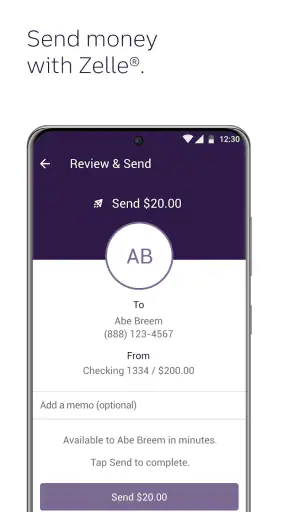
Once I know what needs to happen, the next step is choosing the relevant banking action instead of wandering through unrelated screens. For a transfer, I look for the account-to-account route, review the source and destination, enter the amount, and stop to check the details before submitting. The important part is not speed alone. It is keeping the flow understandable enough that I can catch a reversed account selection or an extra zero.
My strongest practical tip is to treat the confirmation screen as a checkpoint, not a formality. I read the amount, the accounts involved, and the timing shown before I approve anything. That habit is especially valuable on a small display, where a quick tap can feel harmless even though the financial consequence is real. If the task involves a payment rather than a transfer, I apply the same discipline to the recipient and scheduled date.
For people who mainly need to see whether money is available, the app may be more useful than a full personal-finance dashboard. It keeps the information close to the institution that actually holds the account. On the other hand, anyone trying to compare several banks, credit cards, investments, and cash accounts in one place may prefer a dedicated financial aggregation tool. Those tools can offer a wider household view, while Truist Mobile is more direct for actions inside Truist.
Step two: reviewing activity before trusting the outcome
After submitting a transaction, I do not immediately close the app. I return to the account activity and look for the new state of the account. Depending on the type and timing of the action, the visible result may not look identical to a completed settlement right away, so I read the status and recent entries rather than assuming that a tap equals final completion.
This is a useful distinction between “I sent the instruction” and “the money has fully arrived.” If I am moving funds to cover a bill, I would also check the destination account later, particularly when the timing matters. The app can start the workflow and help me inspect it, but it cannot make every external payment process instantaneous. That is a limitation of banking workflows generally, not a reason to skip the verification step.
For a recurring routine, I would use the same sequence each time: open the account view, inspect recent activity, select the intended action, verify every field, submit, and check the resulting status. Repeating a safe sequence is better than relying on memory. It also makes it easier to notice when a familiar screen has changed after an app update or when an account state does not match the previous visit.
The handoffs: where the app meets the rest of banking
The most important handoff is between the app and the financial institution behind it. Truist Mobile is developed by Truist Financial Corporation, so it is naturally most useful to existing Truist customers. The app is not a universal front end for any bank. That sounds obvious, but it is the main decision point: if my accounts are elsewhere, downloading it would not solve my banking problem.
There are also handoffs between the phone, the app, and the bank’s systems. A phone provides the screen and the connection, the app organizes the request, and the institution processes the account action. If one part is slow or temporarily unavailable, the whole workflow can feel interrupted. I therefore avoid repeating a transfer just because the confirmation took longer than expected. First I check the activity and account state; duplicating an action is a worse outcome than waiting a moment.
Another handoff happens when a user moves from the app to a human support channel or a physical banking process. Mobile access is excellent for routine control, but a complicated dispute, identity issue, or unusual account matter may require more explanation than a compact screen can provide. I see the app as the first place I investigate and manage ordinary tasks, not as a replacement for every form of assistance.
That boundary is important for anyone choosing between mobile banking and a branch visit. If I need a quick balance check or a straightforward account action, the phone is clearly more convenient. If the situation depends on documents, detailed clarification, or a sensitive account problem, I would be prepared to continue outside the app instead of forcing the entire issue into a mobile interface.
A second workflow: checking a payment without losing the thread
Consider a different everyday scenario. I have made a payment and want to confirm that it was recorded before I spend the remaining balance. I open the app, identify the account used, review the recent transaction list, and compare the amount with the payment I remember making. If the entry is present, I can make a more informed decision about the money still available. If it is not immediately clear, I avoid treating the absence of an entry as proof that nothing happened.
This workflow shows why transaction history is more than a record for tax season. It is a decision tool. I can use it to spot an unfamiliar purchase, notice that a deposit has appeared, or understand why the available money differs from what I calculated. The best result is not simply seeing a number; it is reducing uncertainty before I make the next payment or transfer.
My advice here is to search by context, not just by amount. A familiar amount may belong to several different merchants or scheduled items. I mentally connect the date, account, and purpose of the transaction. That approach is slower than glancing at the largest number on the screen, but it is less likely to confuse a pending expectation with a completed event.
What the result looks like when the flow works
When the process goes well, I finish with three things: a clear view of the account, a deliberate action, and enough confirmation to know what I should do next. That may mean leaving the app because the transfer is complete, checking again later because processing is still underway, or contacting support because the activity does not match my expectation. The app’s value is in making the first two parts quick and keeping the third part visible.
This is also why I would recommend it to a friend who already banks with Truist and wants fewer reasons to use a computer. The app has a strong reputation among its users, with a 4.8 average from roughly 382 thousand ratings and more than 40 thousand written reviews. It has also passed the million-install mark, which suggests that mobile access is an established part of how many customers interact with the service.
Those figures do not tell me whether every individual task will feel perfect, but they do give useful context. I would expect a mature, widely used banking app to be more practical than experimental. At the same time, popularity does not remove the need to judge it against my own habits, phone, account needs, and tolerance for mobile-only friction.
Where the flow breaks: small-screen friction and cautious users
The first weak point is the phone itself. Banking details are compact, and a small screen can make it harder to compare several pieces of information at once. I am more likely to make a careful transfer on a quiet screen than while walking, rushing, or answering messages. The app may make access convenient, but convenience can encourage careless taps if I treat every task as a one-second job.
The second weak point is uncertainty after submission. A banking app can show the request and its current state, but users still need to understand that processing, account availability, and payment timing are not always the same thing. Anyone who needs guaranteed immediate movement of money should plan around the institution’s timing rather than assuming that mobile submission changes the underlying process.
The third issue is scope. Truist Mobile is a bank-specific tool, not a replacement for a complete household budget system. I would skip it as my primary finance app if my main goal were to categorize spending across multiple institutions, plan long-term goals, or see every financial product in one neutral dashboard. In that case, a dedicated budgeting or aggregation app may be a better companion, while this app remains useful for direct Truist account actions.
I would also hesitate to recommend it as the only option for someone who dislikes handling sensitive financial tasks on a smartphone. A desktop browser may provide a wider view and feel easier for reviewing many transactions. Likewise, people with older devices should pay attention to the Android requirement before depending on the app for daily access. The app is free, but the cost question is not the only consideration: device compatibility, security habits, and comfort with mobile banking matter just as much.
Practical habits that make the experience safer and clearer
I found that the best experience comes from separating observation from action. First I inspect balances and activity. Then I choose the transaction. Finally I verify the result. Combining all three into one hurried sequence makes mistakes more likely, especially when I am distracted by a bill deadline.
I also recommend keeping a simple personal note for unusual transfers: the purpose, amount, and date. That is not a feature claim about the app; it is a useful companion habit. If I later need to explain a transaction or compare it with an expected payment, I have my own context instead of relying on memory.
For shared household finances, I would agree in advance on who checks the account and who confirms a transfer. Mobile access makes it easy for several people to look at the same money, but it can also create confusion if two people act on the same assumption. A clear handoff—one person initiates, another verifies when appropriate—reduces the chance of duplicated work.
Finally, I would not use a visible notification or an old screenshot as the final source of truth. I reopen the account view and inspect the current activity when the decision matters. That extra check takes little time and keeps the workflow tied to the live account rather than to a message that may no longer reflect the latest state.
Who should choose it, and who should look elsewhere?
I think Truist Mobile is a good fit for an existing Truist customer who wants routine banking in a compact, familiar format. It suits people who regularly check balances, review transactions, and manage straightforward account tasks while away from a computer. The free price also makes it easy to try without adding a separate subscription to the banking routine.
I would be more cautious about recommending it to someone choosing a bank solely because of an app. The mobile experience is only one part of that decision. Account terms, service expectations, available products, and personal access needs should matter too. An attractive app cannot compensate for a banking relationship that does not fit the customer.
For a person who already uses several institutions, I would pair it with a broader money-management tool rather than expecting it to provide the whole picture. For someone who prefers branch support or a large desktop workspace, the app should be viewed as an optional convenience, not an obligation. The right choice depends on whether direct mobile access solves a real problem in that person’s day.
My final take after using the complete workflow
Truist Mobile succeeds when I judge it by a clear outcome: start with a real account question, take a careful action, follow the handoff into processing, and confirm what happened. It is strongest as a direct connection to Truist banking, not as a universal financial command center. That distinction keeps my expectations realistic and makes the app easier to appreciate.
Released on April 27, 2021, it has had time to become a familiar mobile option, and its broad adoption and strong average rating support its place among established banking apps. I would recommend it to Truist customers who value quick account access and are willing to verify important transactions instead of tapping through them automatically.
My recommendation is simple: use it for direct Truist banking, but keep a careful eye on the handoffs. Check the starting balance, confirm every destination and amount, review the resulting activity, and switch to a broader budgeting tool or another support channel when the task goes beyond ordinary account management. Used that way, the app feels less like a flashy shortcut and more like a dependable part of a sensible daily banking routine.


